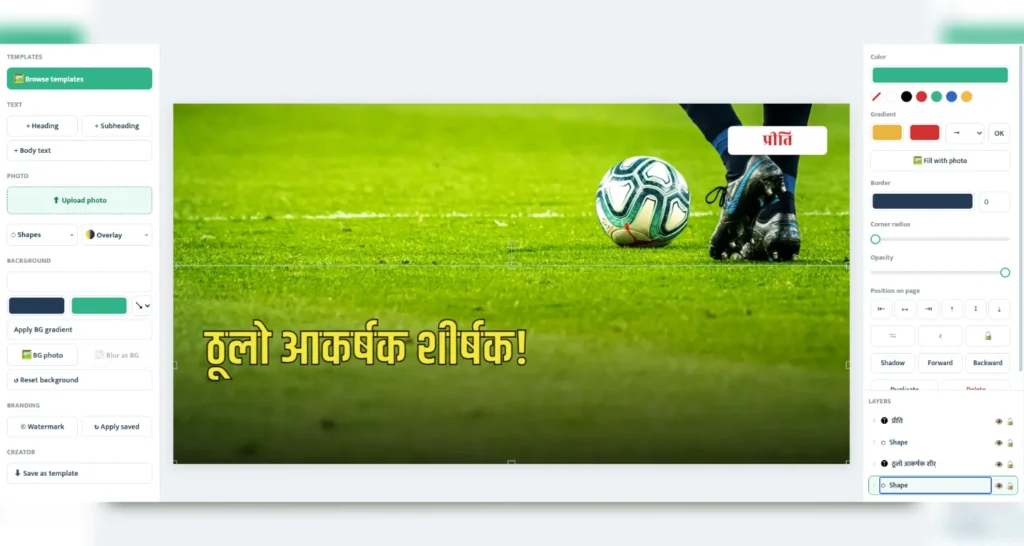
Every article you publish needs one thing before you hit the publish button: a featured image. It is the first thing readers see on your homepage, on Facebook shares, and in Google Discover. But if you write in Nepali, making that image has always been harder than it should be — expensive software, English-only tools, and fonts that break Devanagari text.
That problem is now solved. Preeti Photo Studio is a free Nepali photo editor that runs entirely in your browser. No download, no sign-up, no payment — open the link, pick a template, type your headline in Nepali, and download a website-ready image in under two minutes.
Why Featured Images Matter for Your Website
A good featured image is not decoration — it directly affects how many people read your content:
- Higher click-through rates: Posts with strong featured images get noticeably more clicks from social media and Google Discover.
- Better social sharing: When someone shares your article on Facebook or X, the image is what stops the scroll.
- Faster pages, better SEO: Properly sized, lightweight images improve page speed — a confirmed Google ranking factor.
- Brand recognition: A consistent style with your logo or watermark makes your site instantly recognizable.
For Nepali news portals, blogs and online magazines, the challenge has been creating these images quickly, in Nepali, without a designer. That is exactly what this tool was built for.
What Is Preeti Photo Studio?
Preeti Photo Studio is a free online featured-image maker built especially for Nepali content creators. It comes from the same team behind preetitounicode.com, and it understands the real workflow of Nepali publishers — from Devanagari typography to the lightweight image formats modern websites need.
Key Features That Save You Time
1. 28+ Ready-Made Templates
Start from professionally designed layouts for news headlines, interviews, quotes, sports, food, travel, education and more. Click a template, replace the photo, edit the text — done. Every template is sized for website featured images and social sharing.
2. Type Nepali with Roman Letters
No Nepali keyboard? No problem. Type kasto and press space — it becomes कस्तो automatically, with smart suggestions as you type. Anyone who can type in English can now write headlines in perfect Nepali.
3. 16 Beautiful Devanagari Fonts
From bold news-style fonts like Khand and Teko to elegant choices like Rozha One and Mukta, every font renders Devanagari correctly — no broken characters, no missing matras.
4. Photo Overlays for Readable Text
White text on a bright photo is unreadable. One click adds a professional dark overlay or gradient shade, so your headline always stands out — the same technique big news sites use.
5. Your Own Templates, Saved in Your Browser
Designed a layout you love? Save it to My Templates and reuse it for every article. Your designs stay in your own browser — nothing is uploaded to any server.
6. Logo and Watermark Protection
Add your site’s logo or a copyright watermark in one click. The editor remembers your watermark settings, so branding every image takes a second.
7. Lightweight WebP Export
Download your finished image as WebP — typically 3 to 6 times smaller than PNG with no visible quality loss. Smaller images mean faster pages, happier readers and better Google rankings. PNG and JPG are also available, including 2x resolution for crisp displays.
Who Is This Tool For?
- News publishers who need a professional headline image for every breaking story — fast.
- Bloggers and writers who want beautiful featured images without paying for design software.
- Social media managers creating Nepali posts, quote cards and announcements.
- Teachers and offices making notices, event banners and certificates in Nepali.
How to Create Your First Featured Image (5 Steps)
- Open image.preetitounicode.com in your browser (computer or tablet).
- Click Browse templates and choose a design that fits your story.
- Double-click the headline and type your own — in Roman or Nepali.
- Upload your photo and choose Fill canvas or Fit canvas to place it perfectly.
- Click Download WebP and upload the image to your website. Finished!
Completely Free, Completely Private
There is no account, no watermark forced on your work, and no hidden plan. Your photos never leave your computer — all editing happens inside your browser, which makes the tool both fast and private. Your drafts even auto-save locally, so you can close the tab and continue later.
Final Thoughts
For years, Nepali creators had to choose between expensive design tools and ugly, text-broken images. Preeti Photo Studio removes that choice entirely: a free Nepali photo editor with real Devanagari support, professional templates and SEO-friendly WebP export, available to anyone with a browser.
Try it now: open image.preetitounicode.com and create your first featured image today. If it saves you time, share it with another Nepali creator who needs it.